The article has been updated successfully.

Overview:
There are 2 steps to configuring Holdem Manager to work with iPoker:
Once the above steps have been successfully completed, your HUD will be operational.
Setup iPoker Hand History Options
Note: Always make sure you have the latest version of Holdem Manager before proceeding!
Holdem Manager 2 Update
- Launch iPoker.
- In the iPoker lobby click on Setting > System.
- Make sure "Store Hand History Locally" is selected. Make sure the hands are written in English, or the client was installed in English.
- Play a few Cash Game Hands
- Navigate to your Poker Client install path C:\Users\username\AppData\Local\skin\data\playername\History\Data (It could be in Program files, or x86, just follow the skin name folder on in that folder instead of appdata)*
- Look for the Hand History Folder where Hand Histories are being saved.
- Make note of this folder path and write it down. (We may need this later.)
*Note:
*If you can't see it, turn off the windows option that is hiding that directory.
Now we're ready to tell Holdem Manager where these Hand Histories are. (Click Here)
Please see this web page for a complete list of all iPoker skins.
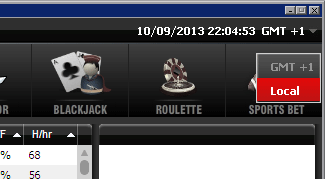
* Site Time Adjustment Warning: Some of the iPoker skins have different lobby time defaults than other skins and we can not detect which skin you are playing on. If you change the iPoker lobby time setting from the default lobby time zone to 'Local' using the down arrow to the right of the lobby time and set the offset to 0 in HM2 > Hand Importing > Site Time Adjustments for iPoker the hands will show in the Reports at your local time and the HUD will work properly regardless of the skin you are playing on. If you leave your iPoker lobby clock set to the default and play more than one skin you will need to adjust the HM2 option accordingly each time you change to a different iPoker skin.