


 The article has been updated successfully.

Question:
How do I mark hands so I can find them easier in my database?
Solution:
- Open a Hand History from a table you are playing at by clicking on a Last Hand Winner name in the Table Summary HUD
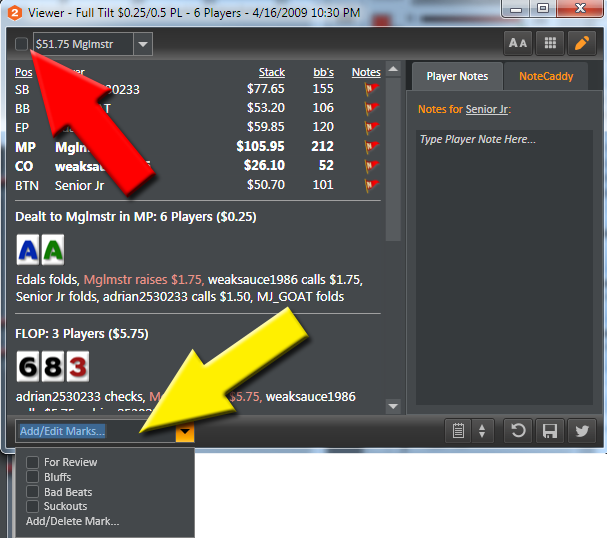
- Look at the picture below and note the box the Red Arrow points to.
- Tick this box to Mark the Hand for Review
- Tick a box in the Yellow Arrow section to add a Custom Tag for the hand. Ceate Custom Tags by selecting Add/Delete Tag
- Check to see the hands have been marked correctly by ticking the Show only Marked Hands in the Holdem Manager Reports Hands View
- Click here to see how to mark hands from the Table HUD using mouse shortcuts OR click here to see how to use Hotkeys to mark hands.
Removing Hand Marks / Tags
To unmark a hand, simple uncheck the checkbox for the marked hand in the hand history viewer or by right clicking a hand in the hand view and unchecking the hand mark / tag.


