


 The article has been updated successfully.

HM2 gives you the ability to post hands in forum friendly formats.
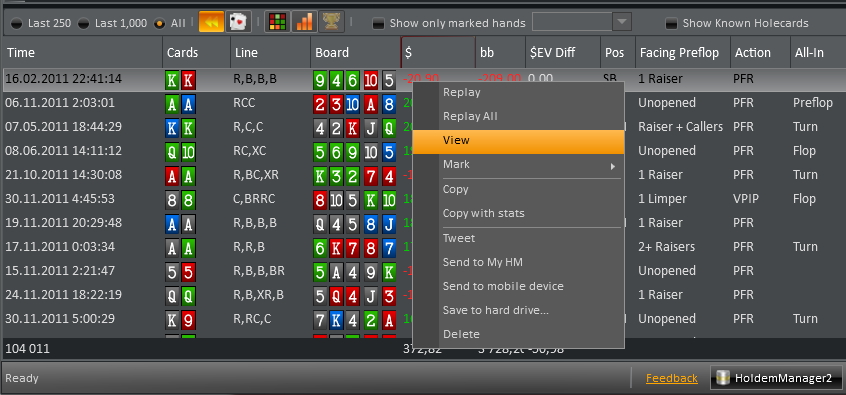
- Open the Hand Viewer by Right Clicking a hand in any hand view. Once you right click the hand, choose "view". This opens up the Hand History view.
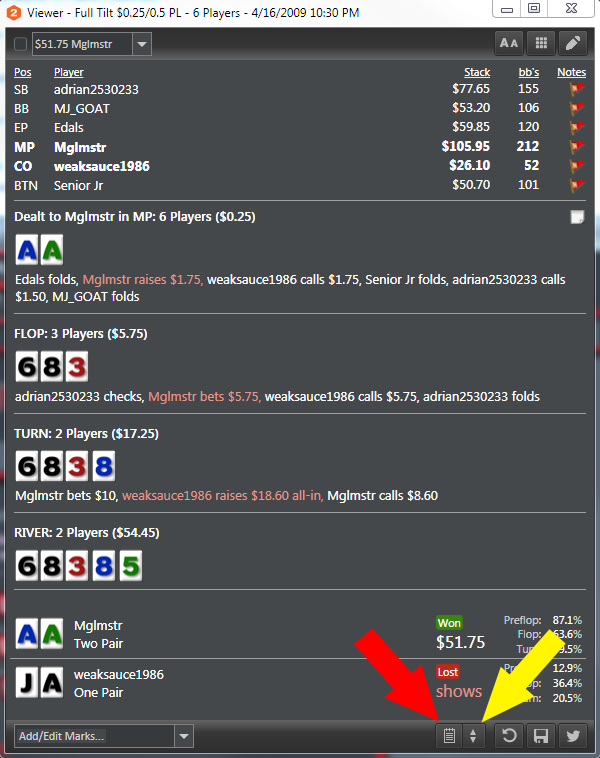
- In the bottom right of this popup, there is a "Copy To Clipboard" option. (RED ARROW)
- To the right of "Copy to Clipboard" is a dropdown with forum friendly formats. (YELLOW ARROW)
- Select the forum you post to in the dropdown box and HM2 will automatically copy the hand to your clipboard in forum friendly formats.
- You can now paste it into your forum post and the hand will show in a friendly format for that forum.
Copy with Stats:
You can also copy a hand with some basic stats including: VPIP, PFR, 3-Bet & Agg Factor.
- To copy with stats, right click a hand in any Hand View and click "Copy With Stats".
- This format is not forum friendly. If you want to convert this to a forum friendly format, visit www.handconverter.com and reformat to the forum of your choosing.
- After "Copy hand with stats" in HM2 go to http://www.handconverter.com and insert the hand via paste or CTRL+V in the blank field under "Hand history here".
- Under "Output format" choose your forum format.
- Click on the "Convert" button at the bottom and you will see the result on the right side from where you can copy/paste it to your forum post.


