Cart
:
Login
:
Create Account
HM2
OM2
HM Apps
Get It Free
Support
Upgrade HM1
Blog
News
Leak Buster
Leak Buster No Limit
Leak Buster Limit
Leak Buster Pot Limit Omaha
TableNinja II
Table Scanner
SitNGo Wizard
Note Caddy
Note Caddy Holdem
Note Caddy Omaha
Tilt Breaker
HM2 FAQs
Forums
Quick Start Guides
Downloads
HM1 FAQs
Welcome to our knowledge base. To find what you're after, use the search box below or choose a category to view listed articles.
Knowledgebase Home
Glossary
Favorites
Contact
Login
Knowledgebase Home
Glossary
Favorites
Contact
Login
Search the Knowledgebase
[Advanced Search]
Browse by Category
-- Select Category --
HM Cloud
- HUD
- System Icon
- Web Client Interface
Getting Started
Home
Reports
- Filters
Sessions
Opponents
- Player Analysis
HM Apps
Options
- Settings
- Hand Importing
HUD (Heads Up Display)
- HUD Options
Holdem Manager 2 TV
Misc
- Frequently Asked Questions
- License & Registration
- Supported Sites - Minimum PC Specs
- Poker Site Information
- XP/Vista/Windows 7 Notes
- PostregreSQL Overview
- PostgreSQL Problems
- PostgreSQL Maintenance
- Game Mode
- Replayer / Hand View
- My HM
- Iphone App
- Holdem Manager Articles
HM App - NoteCaddy
HM App - TableNinja 2
HM App - TableScanner
- Table Scanner Introduction
- Table Scanner Ribbon Options
- Table Scanner Main View
The article has been updated successfully.
Knowledgebase Home
>
Opponents
Videos / Other Resources
No attachments were found.
Remove Highlighting
Edit this Article
Quick Edit
Opponents Introduction
Click a heading below to see more information:
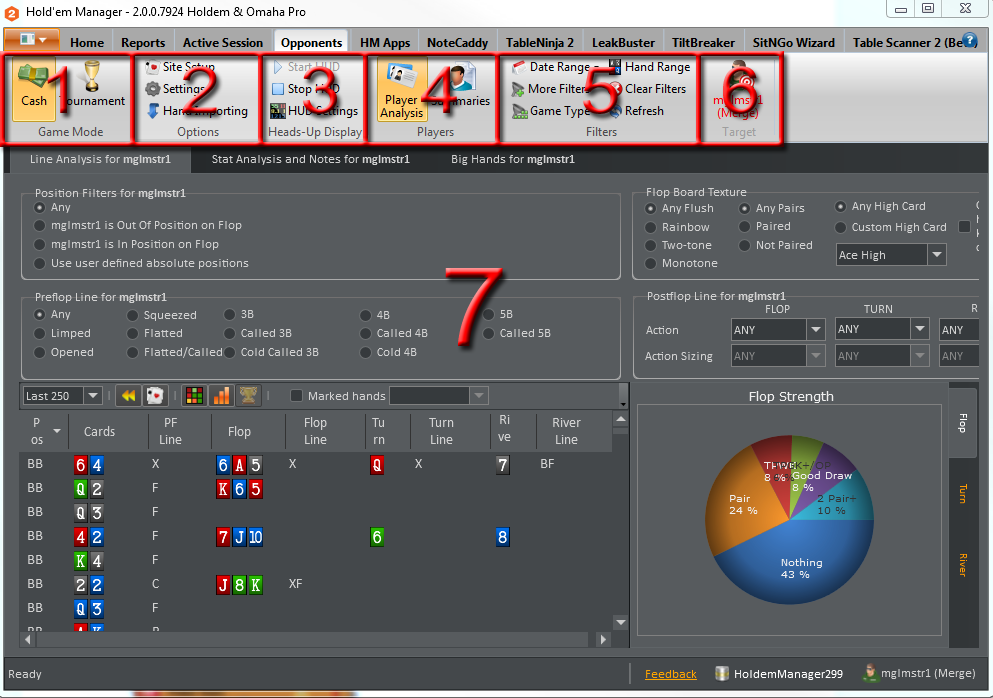
Game Mode
Players
Summaries
Player Analysis
Options
Heads-Up Display
Bottom Status Bar
|
More
Related Articles
PostgreSQL Introduction
Installation and Setup
Holdem Manager 2 TV
Table Scanner - Main Views
Opponents (Ribbon) / Player Analysis / Big Hands
User Opinions
(2 votes)
50%
50%
How would you rate this answer?
Helpful
Not helpful
Help us improve. Why was this unhelpful?
Thank you for rating this answer.
Continue